
 Search for “Is Adobe Firefly free?” and the answers fight each other. One site says you get 25 credits a month. Another says 2,000. A third says “daily generations” and gives no number at all. We read Adobe’s own help pages and plan page on October 16, 2026, to find out which one is right. You will see what free users get, what a credit really buys, and when paying makes sense.
What Is Adobe Firefly
Adobe Firefly is Adobe’s family of generative artificial intelligence tools. You type a short prompt, and it makes images, video, audio, or vector art. The same engine also powers features inside Photoshop, such as Generative Fill. Adobe says Firefly also lets you use partner models from companies like Google and OpenAI.
Firefly runs in a web browser at firefly.adobe.com, and in mobile and desktop apps. It is a text-to-image tool first, but it now covers video, speech, music, and sound effects too. Because it does so many things, its limits are spread across several kinds of credits and daily allowances. That is why the numbers online are so mixed up.
✅ The Short Answer
Yes, Adobe Firefly has a free plan. Adobe’s plan page says you do not need a plan to get free daily generations across image, video, and audio. The limits refresh every day. But Adobe does not publish how many generations you get, so you cannot plan a project around it.
Paid plans are different. Those have a clear monthly number of credits, which Adobe lists on its plan page. If you only want to test ideas, free is fine. If you need a fixed amount of work every month, you need a paid plan.
💡 Quick Tip: Treat the free plan as a trial run. Test your idea there first, then decide if you need credits.
🧩 Why Sites Disagree: 25, 2,000, or Daily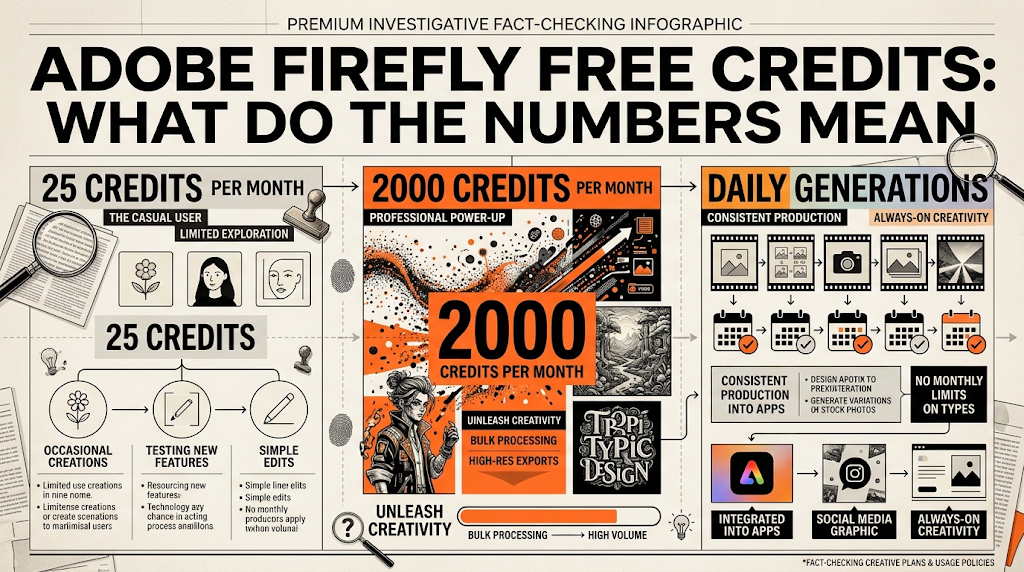
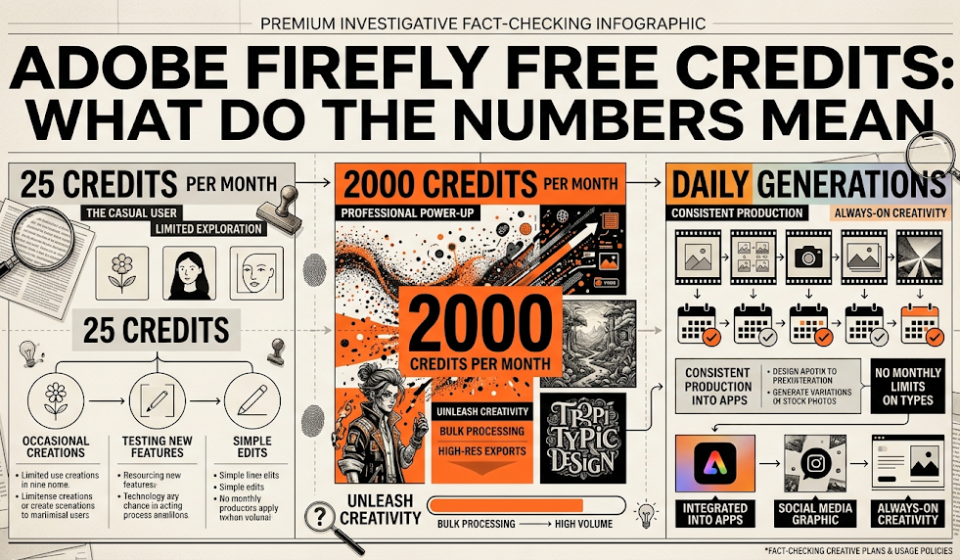
The confusion has a simple cause. Adobe changed its free plan over time, and old articles never got updated. Here is what each number means.
25 credits a month is the older free plan. Some review sites still repeat it, but Adobe’s current pages do not list it. 2,000 credits is the monthly amount for the paid Firefly Standard plan, which Adobe lists on its plan page. Some sites mix this up and write it as the free amount.
Daily generations is what Adobe’s current pages say. Its generative credits FAQ, updated September 30, 2026, says free users get a limited number of free daily generations. It adds that the number of generations, features, and models can change. The same FAQ also still has an older line saying free credits are given on first use and expire a month later. Adobe’s own page is not fully consistent, so check your account.
🆓 What You Get for Free
Adobe’s plan page says free users can try popular models, and it names Nano Banana and Luma Ray3.14 as examples. You can make images, video, and audio, but only inside the daily limit. When you run out, Adobe says you can subscribe, buy credits, or wait until the next day.
Adobe’s AI Assistant page says free generations refresh daily at midnight Greenwich Mean Time. Your own refresh time may feel different, so test it. The credits page also says free users of Firefly, Express, Photoshop on the web, and the mobile apps all share the same idea: a limited number of daily generations on a chosen set of models.
Premium features are limited for free users. Adobe’s table lists “limited complimentary generations” for premium features such as video. In another place, Adobe says some Creative Cloud plans without premium access get a small trial, such as 2 video generations and 40 seconds of translation. That trial is for those paid Creative Cloud plans, so do not assume you will get the same on a free account.
🧮 What Credits Actually Buy
Paid plans use credits for premium features. Adobe’s credits FAQ lists the price of each one. Here are the main ones for Firefly’s own models.
|
Feature |
Credit Cost |
|---|---|
|
Video, 1080p |
100 credits per second |
|
Video, 720p |
50 credits per second |
|
Video, 540p |
20 credits per second |
|
Image, Firefly Image 5 |
10 credits per image |
|
Image, Firefly Image 4 Ultra |
20 credits per image |
|
Sound effect |
10 credits each |
|
Music |
20 credits per minute |
|
Speech, Firefly voice |
10 credits per 1,000 characters |
|
Translate audio or video |
5 credits per second |
Now do the math with a $9.99-class Standard plan, which has 2,000 credits. A 5-second video at 1080p costs 500 credits, so you get only 4 of them. At 720p it costs 250 credits, so you get 8. At 540p it costs 100 credits, so you get 20. 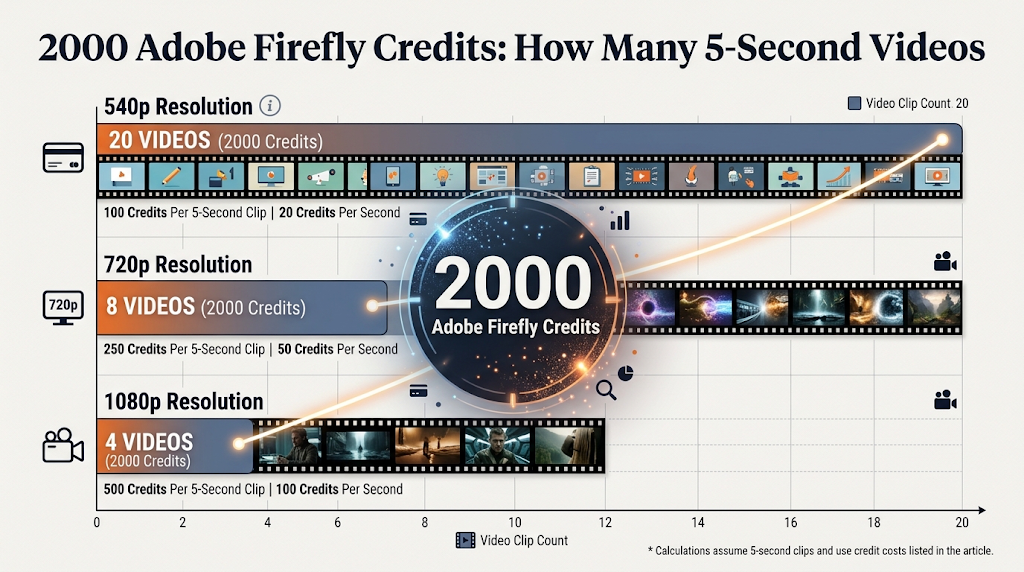
This is the key finding. Adobe’s plan page says Standard makes “up to 20” five-second videos, and that matches the lowest quality, 540p. Many guides repeat “20 videos” without saying that. If you want sharp 1080p video, expect about 4.
💰 Paid Plans Compared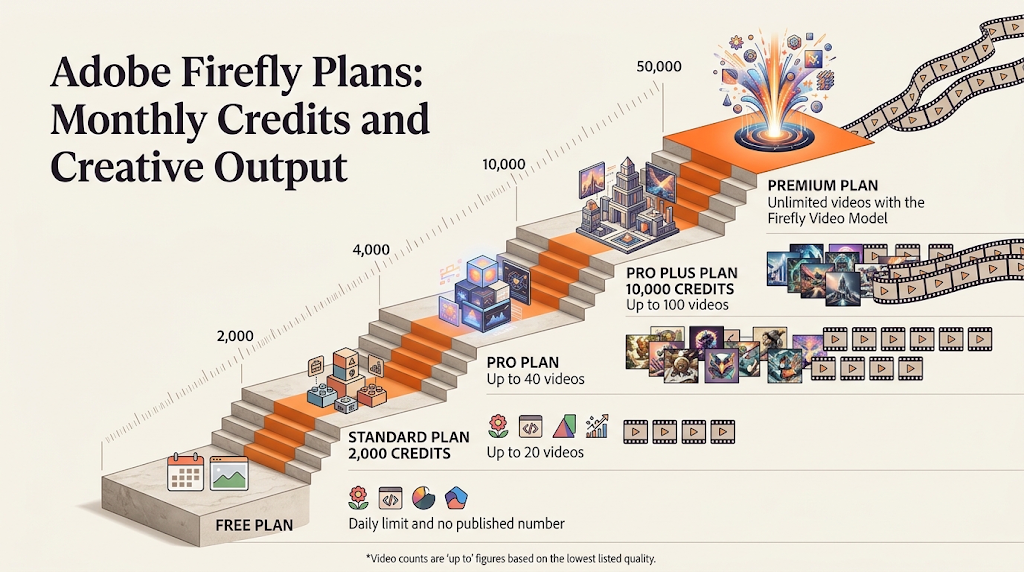
|
Plan |
Credits Per Month |
5-Second Videos |
Translate |
Sound Effects |
Music |
|---|---|---|---|---|---|
|
Free |
Daily limit, no number |
Limited trial |
Limited |
Limited |
Limited |
|
Standard |
2,000 |
Up to 20 |
Up to 6 minutes |
Up to 200 |
Up to 100 minutes |
|
Pro |
4,000 |
Up to 40 |
Up to 13 minutes |
Up to 400 |
Up to 200 minutes |
|
Pro Plus |
10,000 |
Up to 100 |
Up to 33 minutes |
Up to 1,000 |
Up to 500 minutes |
|
Premium |
50,000 |
Unlimited with the Firefly Video Model |
Up to 166 minutes |
Up to 5,000 |
Up to 2,500 minutes |
These numbers come from Adobe’s plan page. The “up to” videos match the lowest video quality.
All paid plans give unlimited access to standard image features, such as Generative Fill, and these do not use credits. Credits are used for premium features like video, audio, and partner models. Credits do not roll over, and they reset on your billing date.
About price: when we opened Adobe’s page, it showed Canadian dollars, with Standard at 12.99 Canadian dollars a month. Price trackers list US prices of $9.99, $19.99, $49.99, and $199.99 a month. We could not confirm the US prices on Adobe’s own page, so check yours before you buy.
🎁 Free Trials and Limited-Time Offers
Adobe’s plan page shows a free trial button for Standard, Pro, and Pro Plus. The page we read does not say how long the trial lasts. Read the terms before you start, since a trial can turn into a paid plan if you forget to cancel.
When we checked on October 16, Adobe also showed a limited-time sale on Pro Plus and Premium, ending October 21. It offered 30 percent off for the first year, plus unlimited generations on select models for the first year. Offers like this change often. If you are reading this later, look at the page for today’s deal. 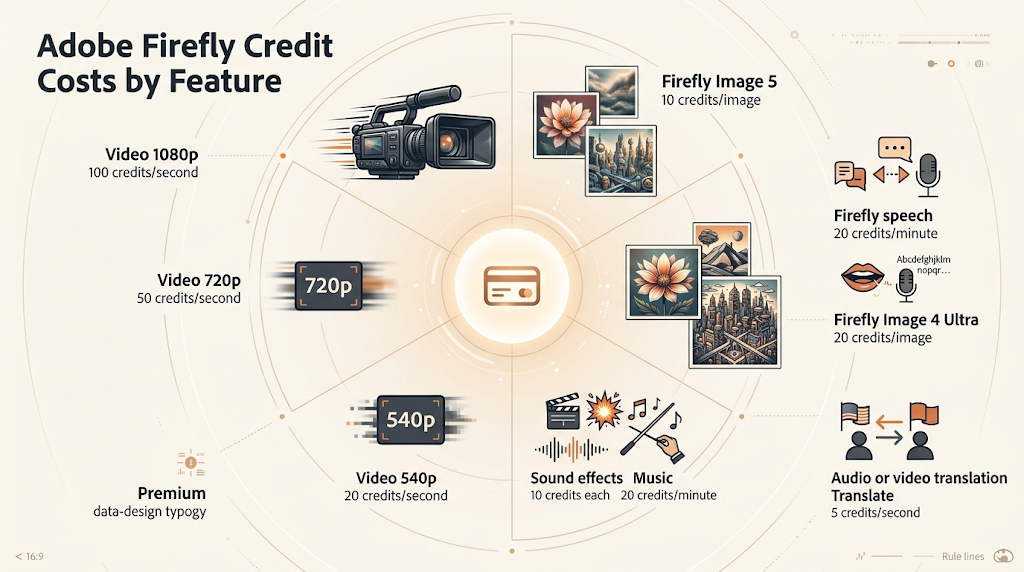
🛠️ How to Start Using Firefly for Free
Go to firefly.adobe.com and pick what you want to make: an image, a video, or audio. Adobe’s page says you can get started without a plan. Choose a model, write a clear prompt, and press Generate. If you are asked to sign in, use a free Adobe account.
Start with images, since they are the cheapest in credits. Keep your prompt short and clear, with the subject, the style, and the light. When a generation finishes, Adobe’s help page says you can hover over the credits icon to see how many credits it used.
If you pay for a plan, check your balance in your Adobe account menu. Adobe says a counter shows how many credits you have left this month. Free users should watch for the paywall message, which tells you when the daily limit is gone.
🔒 Staying Safe: Commercial Use, Labels, and Privacy
Adobe says outputs from its own Firefly models are safe for commercial use. It says those models are trained on licensed content and public domain content. But for partner models from other companies, Adobe says you are responsible for deciding if the output is right for your project. Read Adobe’s rules before you use any image in an ad or a product.
Adobe also adds Content Credentials to Firefly outputs. These are hidden metadata that say how a file was made. Adobe’s watermark FAQ talks about this metadata, and it does not say free images get a visible watermark. Third-party sites claim they do, so check your own downloads and decide for yourself.
Be careful with private photos. Do not upload pictures of other people without their permission, and do not upload private work files to a free tool. Always follow Adobe’s generative AI user guidelines, which Adobe’s FAQ says apply to all users.
⚠️ Common Mistakes to Avoid
The first mistake is trusting an old number. If a site says “25 free credits a month,” check the date, because Adobe’s current pages do not say that. The second mistake is reading “up to 20 videos” as 20 good videos. That number is for the lowest quality, so test one clip at your quality before you plan a series.
The third mistake is forgetting that credits do not roll over. If you pay for 2,000 credits and use 300, the rest are gone at the next billing date. The last mistake is ignoring the trial rules. A free trial can start a paid plan, so set a reminder to cancel if you do not want to continue.
👥 Who Is the Free Plan Enough For
Free is enough if you make a few images a week for fun, for school slides, or for simple social posts. It is also a good way to test prompts before you pay. If you want a clean logo shape, you can try our AI logo generator guide too.
Free is not enough if you make video every week, or if you need a clear monthly number. For other free choices, see our guides to the best free AI image generators with no watermark, the free AI video generators, and free AI image upscalers. To remove a person or object from a photo, read our object removal guide.
📅 How We Checked These Details
We read Adobe’s generative credits FAQ, its plan page, its AI Assistant FAQ, and its watermark FAQ on October 16, 2026. We also compared six third-party review sites, and we only used a number when Adobe’s own page agreed. We did not run our own free test, so we cannot say how many images a free account makes in one day. Adobe says the daily number can change, so check your own account.
❓ Frequently Asked Questions
Is Adobe Firefly free to use? Yes. Adobe says free users get a limited number of daily generations, and the limit refreshes each day.
How many free generations does Adobe Firefly give per day? Adobe does not publish a number, and says the amount can change. Check your own account.
Does the free plan give 25 credits a month? That was an older number. Adobe’s current pages describe daily generations instead.
How many videos can I make with 2,000 credits? Up to 20 at 540p, 8 at 720p, or 4 at 1080p, at 5 seconds each.
Do Adobe Firefly credits roll over? No. Adobe says they reset to your plan amount on your billing date.
Can I use Firefly images for business? Adobe says Firefly model outputs are safe for commercial use. Partner model outputs are your responsibility.
Does Adobe Firefly put a watermark on free images? Adobe’s watermark page does not say so. It adds hidden Content Credentials, so check your own downloads.
Is there a free trial for paid Firefly plans? Adobe’s page shows a free trial button for Standard, Pro, and Pro Plus. The length was not listed.
What happens when I run out of free generations? Adobe says you can subscribe, buy credits, or wait until they refresh the next day.
🎓 Conclusion
Adobe Firefly is free to start, but the free plan runs on a daily limit that Adobe does not put a number on. The 25 and 2,000 you see online are an old free plan and a paid plan mixed up. If you need a clear monthly amount, the paid plans list exact credits, and the video math shows that “up to 20 videos” means lowest quality. Test your idea on the free plan first, check your own limits, and pay only when the free daily limit stops you.
Reviewed by the BrainxoAI Editorial Team, which researches and compares free AI tools for designers, students, and small business owners.