

 A free AI text summarizer takes a long article, document, or report and condenses it into the key points in seconds. This solves a genuinely massive problem, since a Rensselaer Polytechnic Institute study published in Nature Human Behaviour found that information overload costs the global economy roughly one trillion dollars every year. McKinsey’s research adds more detail, finding that knowledge workers spend about 1.8 hours daily just searching for information. In this guide, we will compare the tools that summarize instantly with no account required, how they actually work, and how to pick the right one for you. 📝
🔍 What Is a Free AI Text Summarizer? 
A free AI text summarizer is an online tool that uses artificial intelligence to shorten long text while keeping the important ideas intact. You paste in an article, upload a document, or sometimes even link a webpage, and the tool returns a short, clear summary.
Most tools let you choose the summary style, like bullet points or a short paragraph, along with roughly how long you want it. Some also handle PDFs, YouTube videos, and full webpages, not just plain pasted text.
⚡ Why “No Sign Up” Matters So Much Here 
Creating an account just to summarize one article feels unnecessary for most people, especially for a quick, one-time task. No-signup tools let you paste text and get a summary immediately, without an email, a password, or a confirmation step.
This also matters for anyone summarizing something private or work-related, since a tool that stores less personal information carries less risk. Genuinely no-signup tools exist, though some cap how much text you can summarize at once compared to account-based options.
💡 Quick Tip: For a single article or a short report, a no-signup tool is usually enough. For long, recurring documents, an account-based tool with a higher word limit will save you more time.
⚙️ How Does a Free AI Text Summarizer Work? 
The tool reads your full text using natural language processing, identifying which sentences carry the most important meaning. It then either extracts the most relevant original sentences directly, or generates entirely new sentences that capture the same core ideas.
According to industry research, AI summarizers can reduce document reading and analysis time by up to 70 percent compared to reading the full original text. Longer or more technical documents generally benefit more from this time savings than short, simple articles.
🏆 Best Free AI Text Summarizer Tools to Try 
Here is an honest comparison, focused specifically on sign-up requirements and real free-plan limits.
|
Tool |
Sign Up Needed? |
Free Plan Includes |
Best For |
|---|---|---|---|
|
Web Highlights |
No |
Summarize websites, PDFs, and YouTube in-browser |
Quick summaries without switching tabs |
|
Summarizer.org |
No |
Unlimited basic text summaries |
Fast, simple summaries with no setup |
|
Resoomer |
No |
Free short-text summarization |
Quick reads and short articles |
|
Bearly |
Yes |
Generous free tier, no credit card |
Comparing GPT-4 and Claude summaries |
|
Scholarcy |
Yes |
Limited free academic summaries |
Research papers with flashcard export |
|
SMMRY |
No |
Free text and webpage summaries |
Quick reads with Slack and Notion export |
Free-tier limits and sign-up requirements change often, so always confirm the current policy on the tool’s own website before relying on it for daily use.
Web Highlights and Summarizer.org both stand out for needing no account at all, making them the fastest option for a quick, one-off summary. Bearly is worth the sign-up if you want to compare summaries from multiple AI models side by side.
📝 How to Use a Free AI Text Summarizer (Step by Step) 
Pick a tool from the list above and paste in your text, or upload a document if the tool supports it. Choose your preferred summary length and format, like bullet points or a short paragraph.
Generate the summary, then compare it against the original to confirm nothing important was left out. Copy the final summary into your notes, email, or wherever you need it.
🎯 Key Features Worth Looking For 
Support for multiple content types is valuable, since being able to summarize a PDF or a YouTube video alongside plain text saves you from juggling separate tools. Adjustable summary length matters too, since sometimes you need three bullet points and other times a full paragraph.
A no-signup option is worth prioritizing for occasional use, based on the speed and privacy benefits covered earlier. Accuracy on technical or specialized content is worth testing directly, since general-purpose summarizers can sometimes miss nuance in dense academic or legal writing.
💰 Free vs Paid AI Text Summarizers 
Free plans are great for occasional articles, quick reports, or testing a tool before relying on it daily. Most tools cap you at a certain word count per summary, or a limited number of summaries per day.
Paid plans typically unlock longer documents, unlimited daily use, and extra features like flashcard generation or multi-model comparison. If you summarize documents constantly for work or research, a paid plan often saves real time over hitting free limits repeatedly.
🕵️ The Truth About “Unlimited” Free Summarizers 
Some tools advertise unlimited free summarization, but this usually applies only to shorter texts, with a hidden word count cap for longer documents. This is not necessarily deceptive, but it can catch users off guard when a long report suddenly gets cut off mid-summary.
A genuinely generous free tool, like Bearly, is upfront about its limits and does not require a credit card just to try the free tier. Always test a tool with a document close to your actual typical length before relying on it for something important.
🔒 How to Use These Tools Safely 
Avoid pasting highly confidential or sensitive documents into a summarizer without checking its privacy policy first, since some tools store or process your text on external servers. Stick to well-known, established platforms instead of random new tools with no reviews or track record.
Always read the generated summary critically rather than trusting it blindly, since AI summarizers can occasionally omit an important detail or slightly shift emphasis from the original text.
👥 Who Should Use a Free AI Text Summarizer? 
Students use these tools to quickly review long readings before class or exams. Researchers use them to scan through dozens of papers and decide which ones deserve a full read.
Busy professionals use summarizers to get through long reports and emails faster, directly addressing the 1.8 hours a day McKinsey found workers spend searching for information. Content creators also use them to quickly understand competitor articles before writing something better and more comprehensive.
⚠️ Common Mistakes to Avoid 
Trusting a summary completely without ever checking the original source is the biggest mistake, especially for anything used in important decisions or academic work. Using a general summarizer for highly technical or legal documents without double-checking accuracy is another common slip-up.
Ignoring a tool’s word count limit before pasting in a very long document can lead to a summary that quietly leaves out the ending, so it is worth checking the cutoff first.
🌍 How These Tools Handle Different Content Types 
Not every document is equally easy to summarize, and this is where tool choice really matters. Short news articles and blog posts summarize well with almost any tool on this list.
Academic papers and technical reports are much harder, and specialized tools like Scholarcy, built specifically for research content, tend to preserve important nuance better than general-purpose summarizers. Video and audio content, like YouTube videos, require a tool with dedicated transcription support, such as Web Highlights, rather than a text-only summarizer.
🔗 Pairing Your Summarizer With Other Tools 
Many researchers pair a text summarizer with a free AI note-taking tool, turning a quick summary into organized, searchable notes. Content creators often combine summarizing with a free AI writing assistant, using a summarized competitor article as a starting point for original research.
Chaining tools together this way usually produces a more complete workflow than relying on a summarizer alone.
✨ Tips for the Best Results 
Paste in clean, well-formatted text whenever possible, since messy formatting with broken paragraphs can sometimes confuse a summarizer’s sentence detection. Specify your desired summary length clearly, since a vague request often produces an inconsistent result.
Always skim the original document’s introduction and conclusion yourself, even after summarizing, since these sections often carry context an AI summary can miss.
📊 Free AI Text Summarizer vs Reading the Full Document 
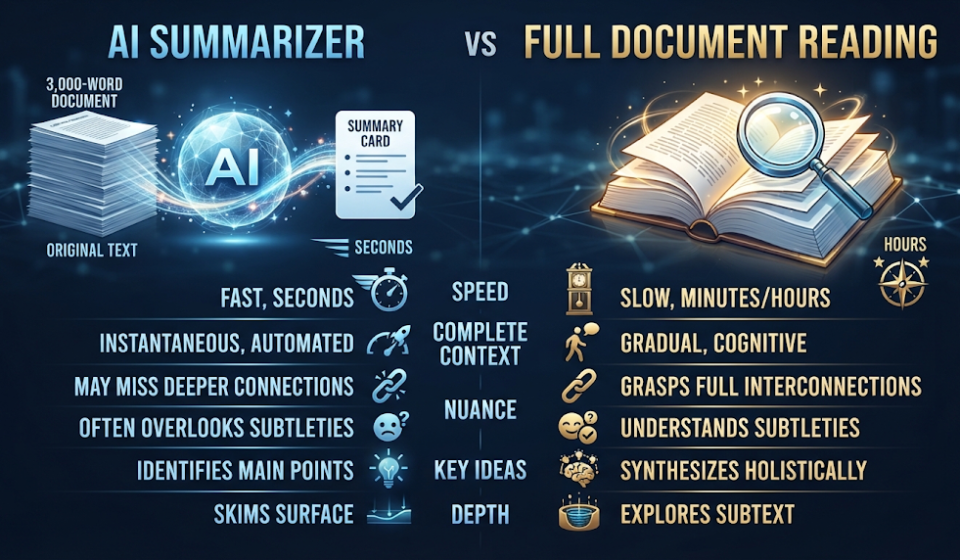
Reading a full 3,000-word article yourself typically takes ten to fifteen minutes, depending on your reading speed and the topic’s complexity. A free AI text summarizer condenses the same article into a readable summary in seconds, cutting that time dramatically.
What reading the full document still offers is complete context and nuance that a summary can sometimes miss. For deciding whether something is worth a full read, though, a quick AI summary is now fast enough to make that call reliably.
❓ FAQs
Is there really a free AI text summarizer with no sign up?
Yes, tools like Web Highlights and Summarizer.org let you generate summaries instantly without creating an account.
How much text can I summarize for free?
This varies by tool, ranging from short single articles on no-signup tools to much longer documents on account-based free tiers.
Are AI summaries accurate enough for research?
They are generally strong for general content, though academic or technical papers benefit from a specialized tool like Scholarcy for better accuracy.
Can these tools summarize PDFs and YouTube videos, not just text?
Some can, including Web Highlights, which supports websites, PDFs, and YouTube videos directly in the browser.
Do I need any technical skills to use a summarizer?
No, most tools only require you to paste in text or upload a file, and the AI handles the rest.
Is it safe to summarize confidential documents with these tools?
Only if you have checked the tool’s privacy policy first, since some platforms store or process your text externally.
Which free AI summarizer is best for students?
Scholarcy is especially useful for students working with academic papers, since it includes flashcard and citation features.
Can I choose how long my summary is?
Most tools let you select a summary length or style, like bullet points versus a short paragraph, before generating.
🎓 Conclusion
A free AI text summarizer can turn hours of reading into minutes of focused understanding, which matters given how much of the workday McKinsey found is spent just searching through information. The key is matching the tool to your content, whether that means a quick no-signup summary for a single article or a specialized tool for academic research. Always compare the summary against the original for anything important, since speed should never fully replace critical reading.
Test the same document across two or three tools before choosing one for regular use. The differences in accuracy and nuance are often more noticeable on longer, denser content than on a short news article. 🌟