

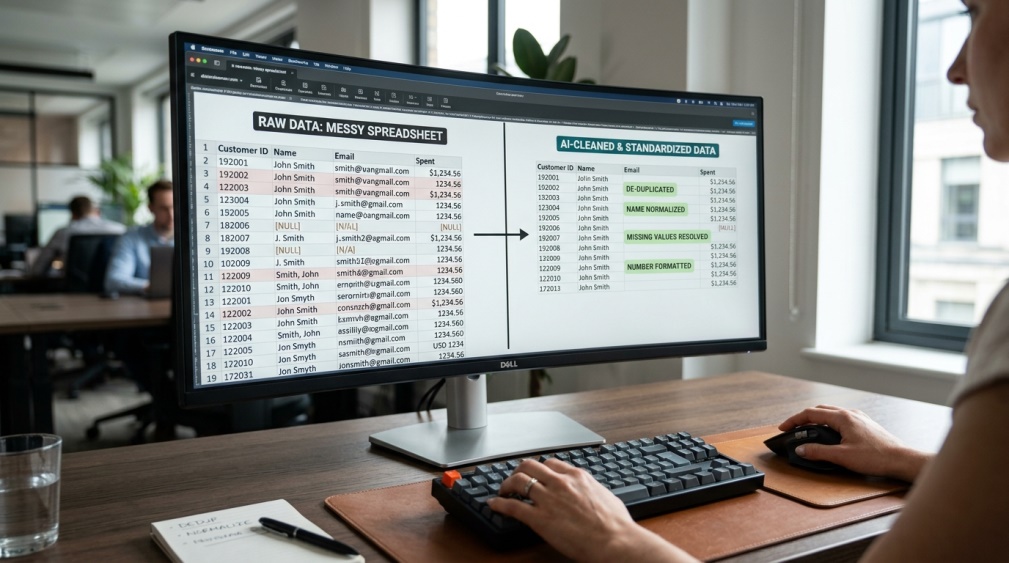
 AI tools for data analysts have completely changed what a single person can get done in a normal workday. Cleaning messy spreadsheets used to eat up most of an analyst’s time, often 60 to 80% of it, before any real analysis could even begin. These tools now handle that grunt work automatically, freeing analysts to focus on the insights that actually matter. Some teams report shipping three to four times more analyses with the same amount of effort. In this guide, we’ll walk through what these tools actually do, the best options to try, and how to pick the right one for your needs. 📈
🔍 What Are AI Tools for Data Analysts?
 These are programs that use artificial intelligence to help with tasks like cleaning data, spotting patterns, building charts, and even writing the code behind an analysis. Instead of manually digging through rows of numbers, you can often just ask a question in plain English.
The tool then handles the technical work behind the scenes, whether that’s writing a formula, running a query, or generating a chart, and hands you a clear answer.
This isn’t just about speed either. It also opens the door for people without a deep coding background to explore data confidently, using plain language instead of complex syntax.
⚡ Why This Combination Matters Right Now
Employers increasingly want analysts who can combine traditional skills with these newer tools. It’s quickly becoming less about replacing analysts and more about making each one dramatically more productive.
💡 Quick Tip: You don’t need to abandon your existing skills. These tools work best when paired with someone who already understands what a good analysis actually looks like.
🔄 How AI Changes Each Stage of Analysis
 Data preparation is where the biggest time savings happen, since AI can automatically clean, deduplicate, and standardize messy datasets. Exploratory analysis gets faster too, with tools automatically generating charts and flagging outliers worth a closer look.
Predictive modeling becomes more approachable, letting analysts build and test models without needing deep statistical training. And natural language querying means you can simply type a question and get a chart or table back in seconds.
Reporting benefits too. What used to take an afternoon of formatting and writing summaries can now often be generated in minutes, with the analyst simply reviewing and polishing the final version.
🏆 Best AI Tools for Data Analysts to Try
 Different tools suit different needs, so here’s an honest breakdown of what stands out in each one.
|
Tool |
Best For |
Starting Price |
|---|---|---|
|
ChatGPT |
Beginners and general use |
Free / $20/mo |
|
Claude |
Complex reasoning, long documents |
Free / $20/mo |
|
Julius AI |
Clean, polished code-generated charts |
Free / paid plans |
|
Hex |
Collaborative team notebooks |
Free tier available |
|
Power BI Copilot |
Businesses already using Microsoft tools |
Included with Power BI |
|
KNIME |
Visual, no-code workflows |
Free / open source |
Try the free tier of two or three tools before settling in. Most analysts end up using a small combination rather than relying on just one.
🎯 How to Pick the Right Tool for Your Needs
 Start by thinking about your actual daily tasks rather than chasing the flashiest tool on the list. A marketer checking simple metrics needs something very different from a data scientist building complex models.
If you already work inside a specific platform, like Excel or Power BI, tools built directly into that ecosystem usually save the most setup time and friction.
It also helps to think about how your data is stored. Someone working mostly with spreadsheets has very different needs from someone querying a large company database every day.
💰 Free vs Paid AI Tools for Data Analysts

Free plans are genuinely useful for testing a tool and handling smaller, everyday tasks. Most analysts can learn the basics without spending anything at all.
Paid plans typically unlock higher usage limits, larger file uploads, and access to more advanced models. Upgrading usually makes sense once free limits start slowing down real work.
🔒 How to Use These Tools Safely With Business Data
 Company data is often sensitive, so it’s worth checking exactly how a tool stores and processes anything you upload. Avoid pasting confidential client information into tools without a clear, trustworthy privacy policy.
Many platforms now offer enterprise plans with stronger data protection specifically for business use. It’s worth exploring that option once you’re working with anything beyond personal practice data.
👥 Who Should Use These Tools?
 Working analysts obviously benefit the most, since these tools directly speed up their daily workflow. Small business owners without a dedicated data team also gain a lot, getting insights they’d otherwise need to hire someone for.
Students learning data analysis benefit too, using these tools to check their work and understand concepts faster than reading documentation alone.
Marketing and sales teams increasingly lean on these tools as well, pulling quick answers from performance data without waiting on a dedicated analyst for every small question.
✨ Tips for Getting the Most Out of These Tools
 Be specific with your questions, since a vague prompt usually returns a vague or unhelpful chart. The more context you give, the better the tool understands exactly what you’re looking for.
Always double-check important results yourself, especially for anything going into a report or a major business decision. These tools are fast, but a quick human review catches mistakes before they matter.
⚠️ Common Mistakes to Avoid
 A common early mistake is trusting every generated result without verifying it against the actual raw data. AI tools are helpful, but they can still misread context or make small errors.
Another mistake is picking a tool based purely on hype rather than your actual workflow. The most popular tool on social media isn’t always the best fit for your specific job.
A quieter mistake is ignoring the underlying data quality altogether. Even the smartest AI tool can’t fix a dataset that was messy or incomplete to begin with, so good habits still matter at the source.
❓ FAQs
Will AI tools eventually replace data analysts?
Most experts see these tools as assistants that handle repetitive work, with analysts still needed for judgment, context, and interpreting results correctly.
Do I need coding skills to use these tools?
No, many tools are built specifically for plain-English questions, though basic coding knowledge still helps for more advanced tasks.
Which tool is best for someone just starting out?
ChatGPT is generally the most beginner-friendly option, since it requires no setup and handles simple data questions well right away.
Is it safe to upload company spreadsheets to these tools?
It depends on the tool, so always check the privacy policy first and avoid uploading highly sensitive data to platforms without clear protections.
How much do these tools typically cost?
Most offer a usable free plan, with paid tiers usually starting around $20 a month for higher limits and more advanced features.
Can these tools handle very large datasets?
Some tools handle large files better than others, so it’s worth checking a tool’s specific limits before relying on it for bigger projects.
🎓 Conclusion
AI tools for data analysts aren’t about replacing the skill, they’re about removing the tedious parts so analysts can spend more time on actual thinking and decision-making. Starting with one or two free tools is enough to see the difference in your own daily workflow.
As these tools keep improving, the analysts who learn to use them well are the ones pulling ahead, not because the tool does the thinking for them, but because it clears the way for better, faster work. 🌟