


 AI-driven automation is quickly becoming one of the most talked-about tools in business today, and it’s easy to see why. Instead of following the same rigid rules over and over, these systems can now adapt, learn, and make smarter decisions on their own. Adoption has jumped fast too, with generative AI usage among businesses rising from just 33% in 2023 to 71% in 2024. In this guide, we’ll break down exactly what this technology does, real examples of it in action, and how to get started, all explained in plain, simple words. 🚀
🔍 What Is AI-Driven Automation?
 At its core, this technology combines artificial intelligence with regular software automation. Traditional automation only follows fixed rules, doing the exact same task the exact same way every time.
AI-driven automation goes further. It can look at unstructured information, make judgment calls, and chain several tasks together into one smooth process that runs with very little human input.
Picture a workflow that used to need five different people checking five different steps. This technology can often handle that entire chain on its own, only flagging a human when something genuinely needs a real decision.
🔄 How Is It Different From Regular Automation?
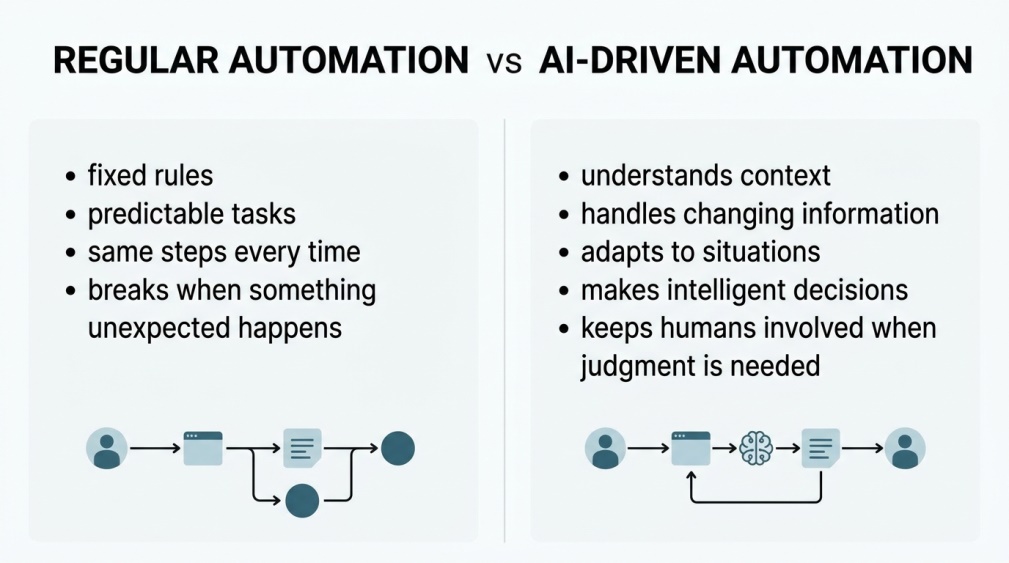 Regular automation is great at simple, repetitive jobs, like moving a file from one folder to another. It can’t really think, though, so it breaks the moment something unexpected happens.
This newer approach can actually handle that unpredictability. It reads context, adjusts on the fly, and still keeps a human in the loop for anything that genuinely needs a person’s judgment.
💡 Quick Tip: A good way to picture the difference is a vending machine versus a smart assistant. One only follows fixed steps, while the other actually understands what you’re asking for.
📊 Why This Trend Is Growing So Fast
Businesses aren’t just experimenting anymore, they’re seeing real results. McKinsey research found that 60% of businesses report improved workflow efficiency after adopting these systems.
Cost matters too. Companies deploying this kind of automation report productivity improvements in the 20 to 25% range, with some long-term projections reaching as high as 40% as these systems keep learning over time.
It’s also worth noting how widespread adoption has become. Roughly 88% of businesses now use AI in at least one function, though many admit they’re still figuring out how to move beyond small pilot projects into full production use.
🏢 Real-World Examples in Action
 Retailers use it to manage inventory, predicting what will sell out before it actually happens. Marketing teams use it to personalize campaigns for thousands of customers at once, something that used to take entire departments.
Finance teams rely on it to match payments with invoices automatically, cutting hours of manual reconciliation work. Customer support teams use it to pull answers from knowledge articles and draft replies in seconds, keeping response times fast even during busy periods.
Even fraud detection has become far more effective, with systems spotting unusual patterns in transactions almost instantly, something that used to take analysts hours of manual review to catch.
💼 Benefits for Businesses
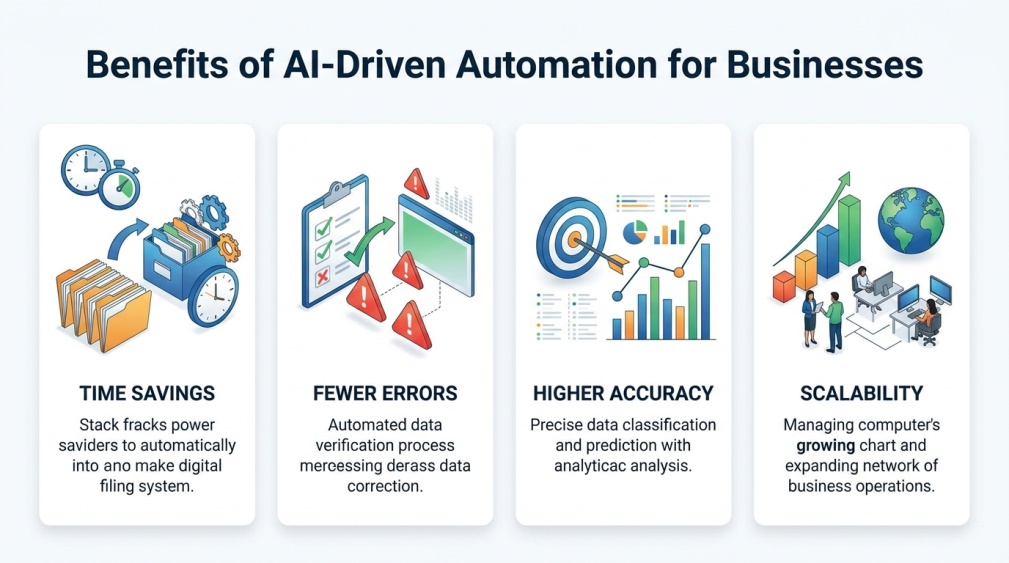 Time savings top the list for most companies. Tasks that used to take a full day can often be completed in a fraction of the time once these systems are properly set up.
Accuracy improves too, since these systems don’t get tired or distracted the way people sometimes do. Fewer mistakes mean less rework, better compliance, and stronger trust from customers over time.
Scalability deserves a mention here as well. A small team can suddenly handle a workload that used to require hiring several more employees, without sacrificing quality or speed.
🧭 How to Get Started With AI-Driven Automation
 The smartest approach is starting small rather than trying to automate everything at once. Pick one high-frequency task with a clear input and output, like handling inbound leads or processing support tickets.
Prove that single workflow actually works and delivers value before expanding further. This cautious, step-by-step approach avoids the common mistake of trying to change everything overnight.
🛠️ Popular Tools Making This Possible
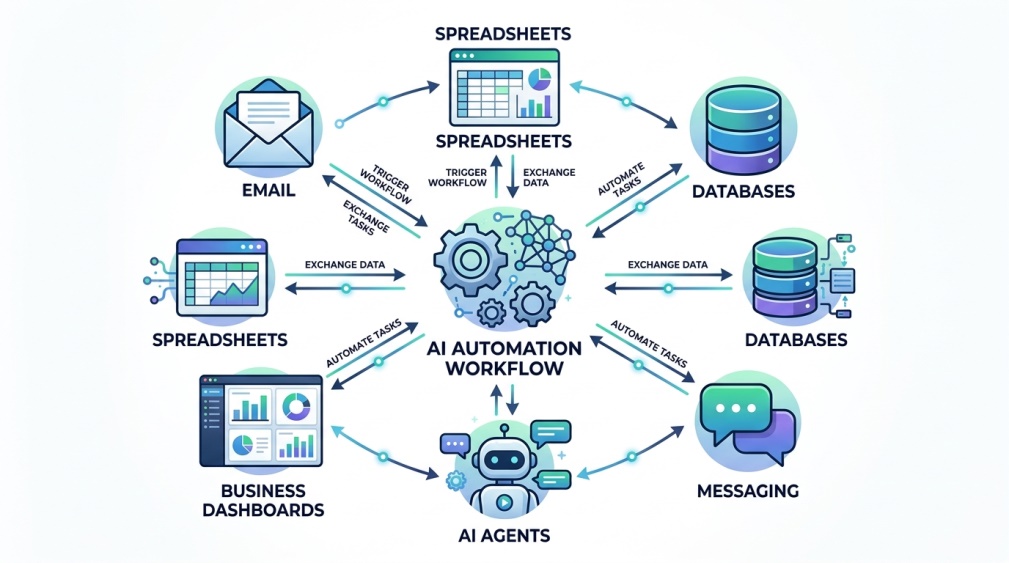 No-code platforms have made this technology far more accessible than it used to be, especially for smaller businesses without a technical team. You can often connect apps and set up smart workflows through a simple visual interface.
For more advanced needs, platforms exist that combine AI agents, databases, and dashboards into one system, letting teams manage entire operations through a single, simple interface.
Many of these tools also connect directly with apps businesses already use, like email, spreadsheets, and messaging platforms, so nothing has to be rebuilt completely from scratch.
🏭 Industries Using This Technology Most
 Retail and e-commerce lean on it heavily for inventory and personalized recommendations. Finance and banking use it for fraud detection and faster transaction processing.
Healthcare organizations use it to speed up administrative work, while manufacturing teams use it to predict equipment issues before they cause costly downtime.
Even smaller service businesses, like local agencies or consultancies, are finding practical uses too, from scheduling to client communication, proving this technology isn’t limited to huge corporations anymore.
🔒 How to Keep Your Automated Systems Secure
Security and access control deserve serious attention as these systems handle more sensitive tasks. Setting clear permissions ensures only the right people and systems can access certain data or actions.
Regular monitoring matters too. Keeping an eye on how automated workflows run helps catch errors early and makes it much easier to fix problems before they affect real customers or operations.
💰 Free vs Paid Automation Tools
Many platforms offer a free tier that’s genuinely useful for testing small workflows before committing to anything bigger. This is a smart way to learn the basics without financial risk.
Paid plans typically unlock higher usage limits, advanced integrations, and stronger support. Growing businesses usually upgrade once their free-tier limits start holding back real work.
👥 Who Should Be Using This Technology?
Small business owners benefit enormously, since these tools let a small team accomplish work that used to require a much bigger staff. Larger companies use it to stay competitive as manual processes become an increasing bottleneck.
Individual professionals benefit too, automating parts of their own repetitive workload, like sorting emails or organizing data, even without any company-wide rollout.
📌 Tips for a Smooth Implementation
Choose one clear, well-defined process to automate first, rather than several at once. This makes it far easier to measure success and fix issues before scaling up.
Keep a human reviewing important decisions early on, even as the system proves itself. Trust should build gradually as the automation demonstrates consistent, reliable results over time.
⚠️ Common Challenges to Watch For
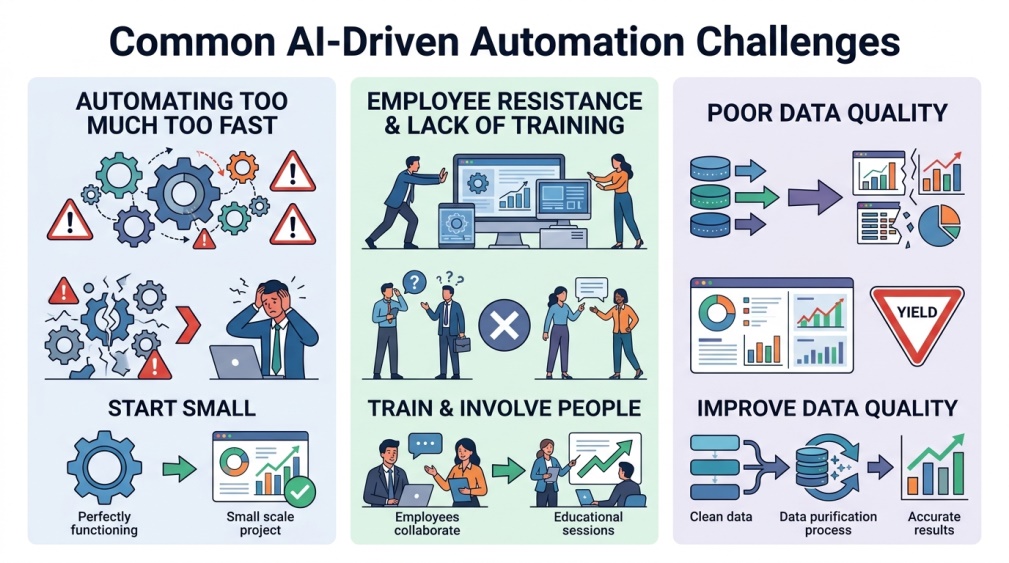 Many organizations struggle simply because they try to automate too much too fast. Without a clear starting point, projects often stall before delivering any real value.
Another common issue is neglecting the human side of the transition. Employees need training and reassurance, since resistance to change can quietly undermine even a technically excellent system.
A third challenge worth mentioning is poor planning around data quality. If the information feeding into these systems is messy or outdated, even the smartest automation will produce unreliable results.
❓ FAQs
Is AI-driven automation only useful for large companies? No, small businesses often benefit the most, since these tools let a small team handle work that previously required a much larger staff.
Does this replace human employees entirely? Not usually, since most systems are designed to handle repetitive tasks while people focus on judgment-based work and important decisions.
How much does it typically cost to get started? Many platforms offer free plans for small workflows, with paid tiers becoming worthwhile once a business needs higher usage limits or advanced features.
Is it difficult to set up without a technical team? Not anymore, since many modern platforms use simple, visual interfaces that don’t require deep coding knowledge to build a working automation.
What’s the biggest benefit businesses actually notice first? Time savings tend to be the most immediately obvious benefit, often followed by fewer errors and more consistent results over the following months.
How do I know which task to automate first? Look for a repetitive task with a clear starting point and ending result, like processing invoices or responding to common customer questions.
🎓 Conclusion
AI-driven automation isn’t some distant future concept anymore, it’s already reshaping how real businesses handle everyday work, from customer support to inventory management. The organizations getting the most value tend to start small, prove results with one workflow, and expand carefully from there.
Whether you’re running a small business or working within a larger team, this is one of those tools that quietly pays for itself once it’s set up properly. Starting today puts you ahead of the competitors still doing everything manually tomorrow. 🌟