


 Learning how to develop AI software might sound complicated, but the process is actually easier to follow than most people expect. Every AI project, no matter how advanced, follows the same basic path from idea to finished product. This field has grown fast, with GitHub research showing AI-assisted developers finishing tasks up to 55% faster than before. That kind of speed boost is exactly why so many teams and beginners are diving in right now. In this guide, we’ll walk through every step in plain, simple language, so you know exactly where to start. 🚀
🔍 What Does It Mean to Build AI Software?
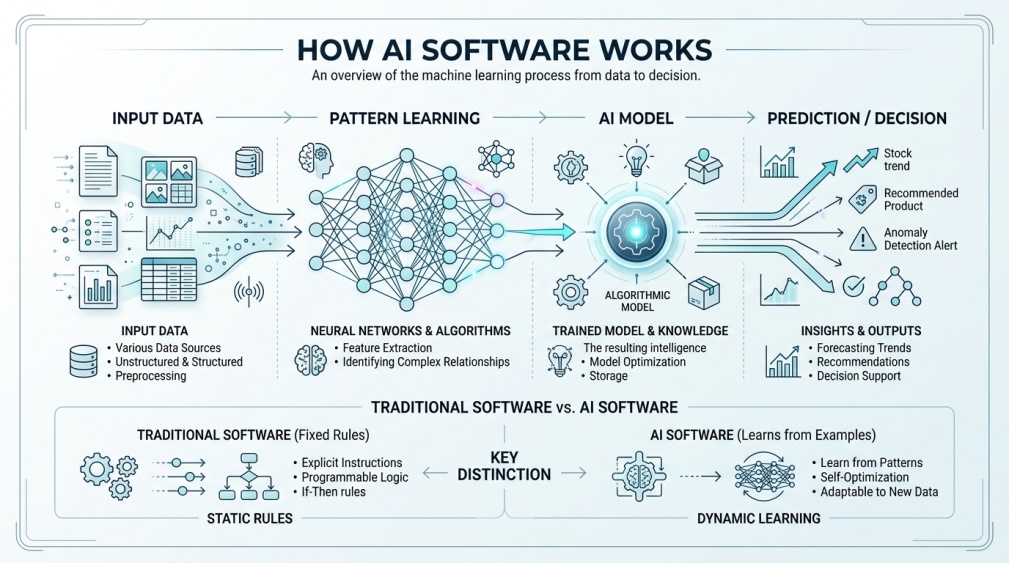 Building AI software means creating a program that can learn from information instead of just following fixed instructions. Regular software does exactly what it’s told, every single time. AI software studies examples and gets smarter as it goes.
This is why the process feels different from regular coding. You’re not just writing rules anymore. You’re teaching a system how to make its own decisions based on patterns it discovers.
It helps to think of it like teaching a new employee. You don’t hand them a giant rulebook for every possible situation. Instead, you show them plenty of examples until they start recognizing patterns on their own.
🎯 Why Learn to Build AI Software Right Now?
Businesses are moving fast in this direction, and the numbers back that up. Industry reports suggest that by 2026, more than 80% of enterprise applications will include some kind of AI-driven feature.
Beyond the business angle, it’s also just a genuinely useful skill. Whether you’re a solo developer or part of a bigger team, knowing this process opens doors that plain coding skills alone don’t.
💡 Quick Tip: You don’t need a computer science degree to start. Many successful beginners learn the basics through free tutorials and small practice projects first.
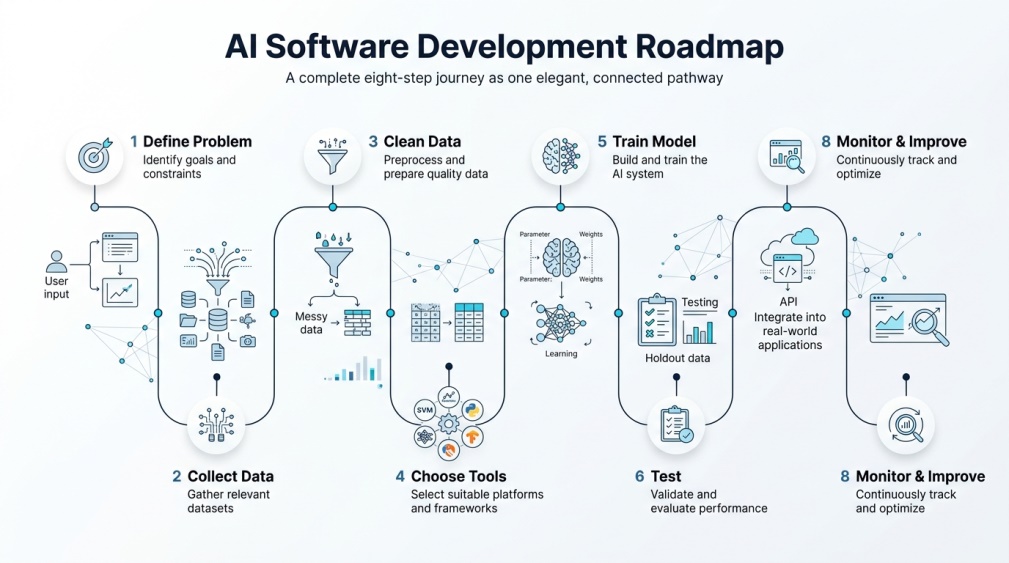
🧩 Step 1: Define the Problem You Want to Solve
 Every AI project starts with a clear question, not a line of code. What exact problem are you trying to fix, and how will you know if the AI actually solved it?
Skipping this step is one of the biggest reasons AI projects fail later on. A vague goal leads to vague results, so spend real time getting this part right before moving forward.
Try writing your goal down in a single, clear sentence. If you can’t explain the problem simply, it usually means more thinking is needed before touching any code at all.
📂 Step 2: Collect the Right Data
Once your goal is clear, you need information for the AI to learn from. This might be text, images, numbers, or a mix of everything, depending on your project.
Aim for data that’s both relevant and varied. A small, narrow dataset often teaches the AI the wrong lessons, even if the data itself is technically accurate. 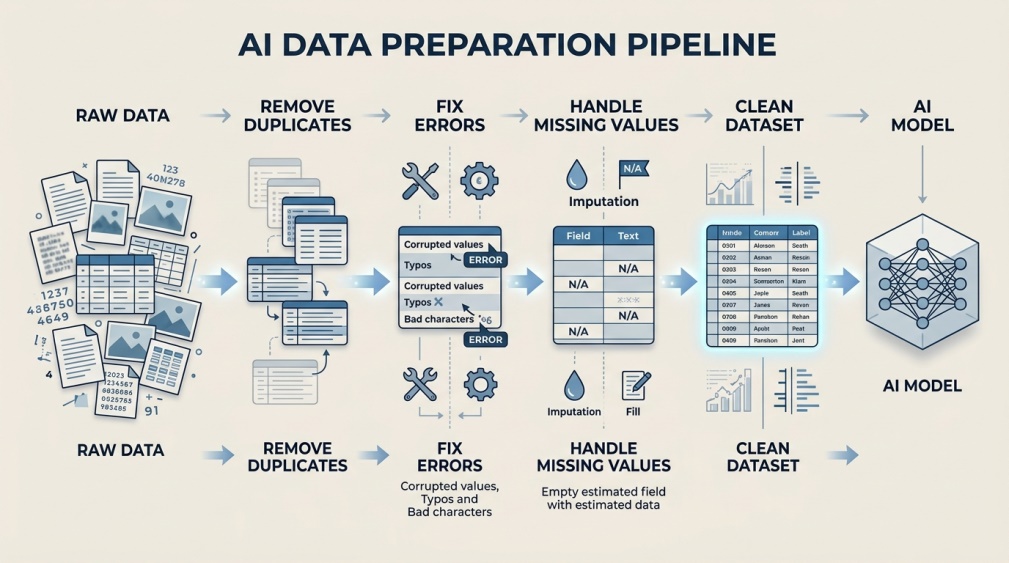
🧹 Step 3: Clean and Prepare Your Data
Raw data is almost never ready to use straight away. This step involves removing duplicates, fixing errors, and filling in missing pieces so the information is actually usable.
It’s tempting to rush through this part, but it matters more than most beginners realize. Messy data leads directly to a messy, unreliable AI model, no matter how good your next steps are.
🛠️ Step 4: Choose Your Tools and Programming Language
 You don’t need to build everything from scratch. Most developers rely on Python, along with popular frameworks like TensorFlow or PyTorch, to handle the heavy technical work.
At this stage, also decide whether to build a custom model or use an existing pre-trained tool instead. Many smart teams choose the second option to save time and avoid reinventing something that already works well.
Cloud platforms are worth mentioning here too. They let you access powerful computing resources without buying expensive hardware, which makes this whole process far more accessible than it used to be.
🏋️ Step 5: Build and Train Your AI Model
This is where things really start coming together. You feed your cleaned data into the system, and it begins learning to spot patterns and make predictions on its own.
A common approach uses about 80% of your data for training and saves the remaining 20% for testing later. This process usually repeats several times as the model slowly improves.
🔬 Step 6: Test the AI System Thoroughly
Testing checks whether your AI actually performs well on new information it hasn’t seen before. This step catches problems early, before they become expensive mistakes later on.
Good testing isn’t a single check either. It’s an ongoing process of spotting weak spots and going back to refine the model until results feel genuinely reliable. 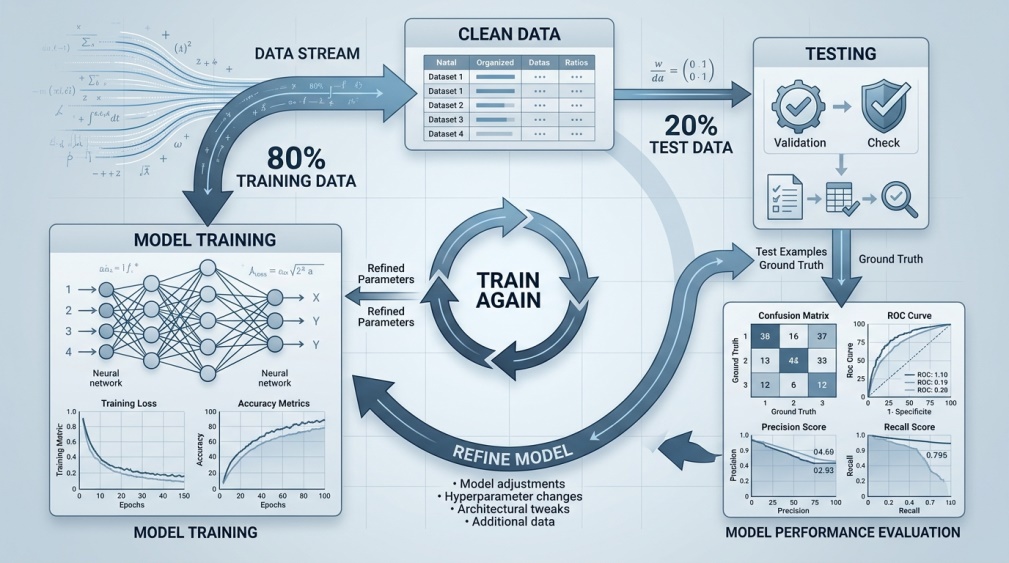
🚀 Step 7: Deploy the AI Software
 Once testing looks solid, it’s time to put your AI system into real use. This might mean adding it to an app, a website, or an internal business tool.
Deployment also means making sure the system runs smoothly under real conditions, not just in a controlled testing environment. Performance and reliability matter a lot here.
📈 Step 8: Monitor and Improve After Launch
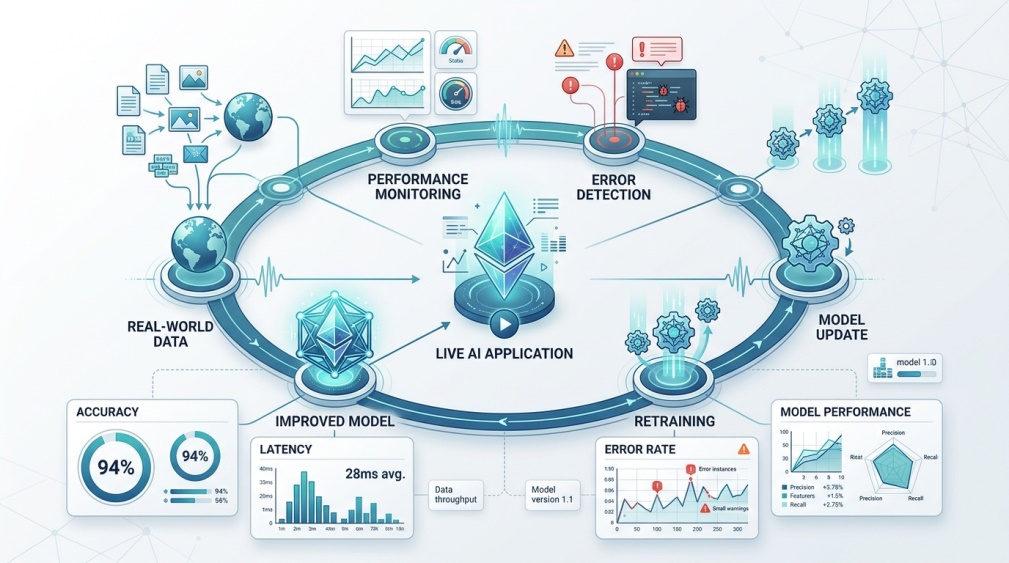 Launching your AI software isn’t really the finish line. Real-world use often reveals things testing missed, so ongoing monitoring is essential.
Many AI systems keep learning from live data even after launch, which means small updates and improvements should become a regular part of your workflow going forward.
✨ Benefits of Learning to Develop AI Software
Cost savings are a big draw here, with some organizations reporting a 20 to 40% drop in development costs after adopting AI-assisted workflows. That kind of efficiency is hard to ignore.
Quality improves too. AI-powered testing tools have been shown to catch far more bugs before launch compared to traditional manual methods, which means fewer headaches down the road.
🔒 How to Use AI Development Tools Safely
Data privacy deserves real attention throughout this whole process. Always check how your chosen tools store and handle any data you upload or connect to your project.
Stick to well-documented, reputable platforms rather than obscure tools with unclear privacy policies. This matters even more if you’re working with sensitive business or user information at any stage.
💰 Free vs Paid AI Development Tools
Plenty of powerful tools, like TensorFlow and PyTorch, are completely free and open source. This makes it very possible to start learning without spending anything at all.
Paid platforms usually offer more support, easier setup, or extra computing power for larger projects. Beginners rarely need this right away, but it becomes useful as projects grow more complex.
👥 Who Should Learn This Skill?
Developers looking to expand beyond traditional coding are an obvious fit here. This skill set opens up a much wider range of project types and job opportunities.
Founders and small business owners benefit too, even without deep technical backgrounds, since understanding the process helps them work more effectively with technical teams later on.
📌 Tips for Beginners
Start with a small, simple project instead of an ambitious one right out of the gate. A basic prediction tool teaches you the full process without overwhelming complexity.
Free online courses and community tutorials are genuinely enough to get started. You don’t need an expensive bootcamp to learn the fundamentals covered in this guide.
⚠️ Common Mistakes to Avoid
Jumping straight into building without clearly defining the problem first is one of the most common early mistakes. This almost always leads to wasted time later.
Another frequent slip is skipping proper testing because a model seems to work fine at first glance. Problems that aren’t obvious in early testing often show up once real users start interacting with the system.
A smaller but costly mistake is ignoring data quality in favor of data quantity. A huge pile of messy information almost always performs worse than a smaller, carefully cleaned dataset.
❓ FAQs
Do I need to know how to code to develop AI software? Basic coding knowledge, especially in Python, makes the process much easier, though some beginner-friendly tools now require very little coding at all.
How long does it usually take to build an AI system? Timelines vary widely depending on complexity, but small beginner projects can often be completed within a few weeks of focused effort.
Is it expensive to start learning AI software development? Not necessarily, since many of the core tools and frameworks used in this field are completely free to use.
What’s the most important step in the whole process? Clearly defining the problem at the very beginning tends to have the biggest impact on whether the entire project succeeds.
Can I build AI software without a technical background? Yes, especially with today’s beginner-friendly tools and tutorials, though a basic understanding of programming logic still helps quite a bit.
Do I need a huge amount of data to get started? Not for small learning projects, though your data should still be clean, relevant, and varied enough to teach useful patterns.
Is testing really necessary if the model seems to work already? Yes, thorough testing catches hidden issues that often only appear once real users start using the system in unpredictable ways.
🎓 Conclusion
Learning how to develop AI software comes down to following a clear, repeatable process: define your problem, gather good data, choose the right tools, train and test carefully, then deploy and keep improving. None of these steps require expert-level skills to begin.
Start small, stay patient through the testing phase, and treat every project as a learning experience rather than a one-shot attempt. That mindset is really what separates beginners who stick with this skill from those who give up too soon. 🌟